Building a Caregiver Alert Setup Your Parent Will Actually Wear
Medical alert systems fail for one reason: the button stays in a drawer. How to choose placement, who receives the alert, and what to test before you rely on it.
The conversation usually starts after a fall, or near miss, or a hospital discharge. Someone in the family buys an alert device, sets it up, shows a parent how it works, and within three weeks it is sitting in a drawer next to the charger.
That failure is not about technology. It is about the setup, and the setup is fixable.
Why alert devices get abandoned
Three reasons, in order of frequency.
It is not within reach when it is needed. A button in a drawer is a button that will not be pressed during a fall in the bathroom. Wearables solve this only if the person actually wears them, which leads to reason two.
It is uncomfortable or embarrassing. A pendant that looks medical, an obvious bracelet, a device that announces itself. Many people would rather risk the floor than look frail in front of a neighbor.
It creates a chore. Something to charge, something to remember, something that beeps when it wants attention. Devices that demand maintenance get abandoned by anyone who has enough on their plate.
Every good setup addresses all three at once. The button is reachable from the toilet, the shower, the bed, and the kitchen. It does not look like medical equipment. And it does not need charging every night.
Which alerts matter, and which are noise
Before choosing hardware, decide what a press should actually do. There are two different jobs and they want different notifications.
A help request means "I need assistance, nothing is on fire." Someone to help you up, bring water, or come over because you feel unsteady. This should go quietly to family, with a friendly notification.
An emergency means "come now." A fall with injury, chest pain, trouble breathing. This should be loud, repeated, and reach more than one person.
Systems that treat both identically either annoy everyone into ignoring them, or under-react to the one that matters. Whatever you choose, make sure the people receiving alerts know which is which.
Wi-Fi versus a monitored service
A Wi-Fi alert button connects to your parent's home network and sends a notification through an app to people you choose. There is no monthly fee and no call center. The alert goes to family, and only family.
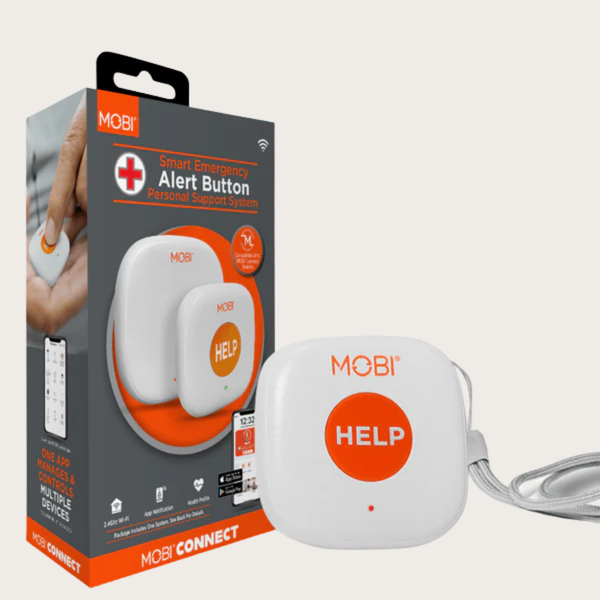
The advantage is cost and simplicity. The MOBI smart caregiver support system includes a wearable alert button and sends an instant notification to family through the app, with no monthly fee, and it doubles as the hub for additional buttons around the home.
The limitation is honest and important: this is a family-notification system, not a monitored medical service. If nobody is looking at their phone, nobody is coming. That is why the setup below matters more than the hardware.
A professionally monitored service adds a call center that will attempt contact and dispatch help. It costs money every month and works without any family member being available. If someone lives alone with no nearby family and has significant cardiac risk, that is a real argument for monitored service, and no Wi-Fi button replaces it.
Many families use both: the button for family, the monitoring service for the worst case.
Placement: the four rooms that matter
Bathroom. Falls happen here more than anywhere else, and it is where a button is least likely to be worn. Put a fixed button on the wall within reach of the toilet and the shower, at seated height, not standing height.
Bedroom. Within arm's reach of the bed, on the nightstand or the wall beside it. Not across the room.
Kitchen. Wherever the person spends the most waking hours. On the counter, not in a drawer.
Path between them. If the hallway is long, that is where a third button earns its place.
The add-on HELP button exists for exactly this: it pairs with the MOBI caregiver hub so you can put a second press-point in the bathroom or bedroom without buying a second base system. One press sends an assistance alert through the app.
Wearability, solved by not requiring it
Some people will happily wear a pendant. Many will not. The compromise that works: a wearable for the hours they leave the house, and fixed buttons everywhere they might fall at home.
If a pendant is acceptable, wear it under clothing, not over it. If it will be refused over clothing, it will be refused entirely.
The setup conversation, in a form that works
Lead with independence, not safety. "This keeps you in your own house" lands better than "this is in case you fall."
Frame it as one shared system. If the family member across town also has the app and can see the alert, the device becomes a connection rather than surveillance.
Do not oversell it. Be explicit that pressing the button does not summon an ambulance and that it calls family. People trust systems they understand, and they abandon systems that surprised them.
The test that everyone skips
Set a date and press the button together, with everyone in the room. Watch the notification land on every phone that should receive it. Time how long it takes.
Then do it again a week later, without warning, and see whether the person remembers how to press it. If they hesitate, the button is in the wrong place or the press is not obvious.
Check the batteries on a calendar reminder. A button with a dead battery is worse than no button, because everyone has stopped worrying.
Medication, the other daily risk
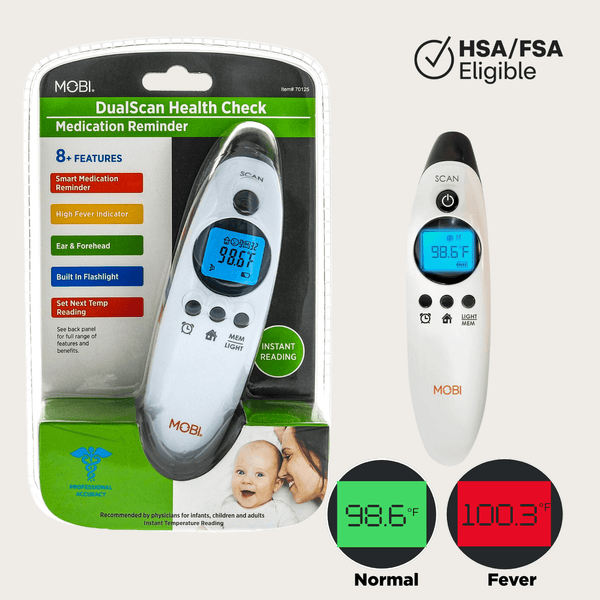
Falls get the attention, but missed medication is the more common daily problem. A thermometer with a built-in medication reminder alarm is a small, non-medical-looking way to prompt the next dose during an illness, when schedules fall apart. The DualScan Health Check reads from ear or forehead and sounds the reminder, which is more acceptable to many older adults than a pill organizer on the counter.
What the family needs on their side
- One group text or app thread dedicated to alerts, so a notification is never lost in a busy chat.
- A written plan for who responds first, second, and third.
- A key or code to get in, agreed in advance and stored securely.
- A list of medications and doctors somewhere everyone can find it in a hurry.
The honest summary
An alert system is not a device. It is a device plus a placement plan plus people who answer. Get the placement right, be clear about what the button does, test it out loud, and it will be there when it is needed. Skip those steps and you have bought a gadget that lives in a drawer, which is the outcome everyone involved was trying to avoid.
This article is general information, not medical advice. For someone with significant medical risk living alone, discuss monitored options with their clinician.
Devices mentioned in this article
Keep reading
Wi-Fi vs. Dedicated Baby Monitors: The Trade-off Nobody Explains
One streams to your phone from anywhere. The other works when your internet does not. How to choose between them, and why many families end up wanting both.
Read articleWrist vs. Upper Arm Blood Pressure Monitors: An Honest Comparison
A wrist cuff is easier to put on and an arm cuff is easier to trust. Here is how the two differ in real use, how to take a reading that counts, and who should pick which.
Read articleHow to Clear a Baby's Stuffy Nose Without a Fight
Babies cannot blow their noses, and congestion at night is miserable for everyone. A calm, step-by-step routine using saline, suction, and timing that actually works.
Read articleComparing models? See the full MOBI catalog side by side.
Compare products